Moving off Stocky: the bundle slice
Shopify retires Stocky on August 31, 2026. Most of the migration conversation is rightly about purchase orders and forecasting, and this page is not about those. It is about the one slice that usually gets forgotten until it breaks: bundles and kits. If you used Stocky to assemble kits from components and keep their stock honest, that workflow needs a new home before the shutdown, and it is the one part of your Stocky setup where the replacement can actually be better than what you had. Coming from a dead bundle app instead? Read the Rebolt guide.
Scope, stated plainly: Solid Bundles replaces Stocky's bundle and kit slice: kit definitions, component inventory, component SKUs on orders, volume pricing. It does not replace purchase orders, demand forecasting, stocktakes, or barcode workflows. For those, look at Shopify's built-in POS inventory features and dedicated inventory apps. One tool per job.
What actually breaks on August 31?
Whatever kit assembly you ran in Stocky stops existing. The kits you already assembled remain as product stock, and the orders you already shipped stay complete. What disappears is the ongoing process: converting component stock into kit stock, and unwinding it when plans change. If you sell kits year-round, that process has to land somewhere new. Export deadlines for Stocky data are in Shopify's official retirement notice; check them for your store rather than trusting any third party's summary, including ours.
Assembly kits vs checkout-time expansion
Stocky's model is assembly: you physically or logically build N kits, stock moves from components into the kit product, and the kit sells as one SKU. It works, but it has a standing cost: stock is committed to kits before anyone buys them, unwinding takes another adjustment, and the order your warehouse receives names the kit, not the parts.
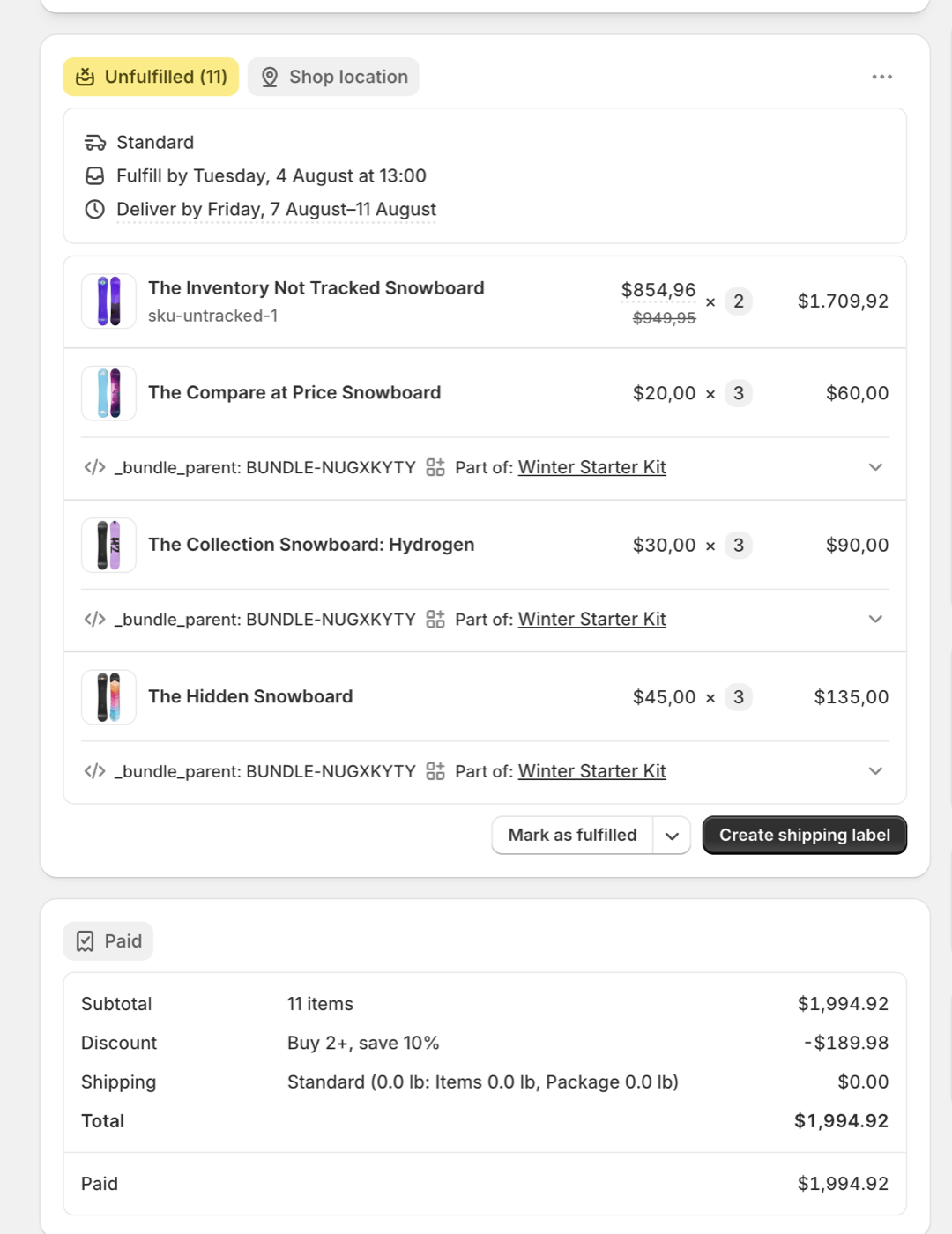
Checkout-time expansion inverts this. The kit is a recipe, not a build. Components stay as components on the shelf and in Shopify. When a customer buys the kit, Shopify constructs the order with the real component line items already in it: each with its own SKU, quantity, and price, plus a reference to the kit it came from. Inventory decrements on the components at the moment of sale. There is no assembly step, no committed stock, and no drift between what Shopify thinks is in a kit and what is on the shelf. Refunds work at component level too: a customer returns one item from the kit, you refund and restock that component.
This is a real paid order produced that way, not a mockup:
What should I check before choosing a replacement?
Whatever app you evaluate, including ours, make it pass these four checks before you commit. Each targets a failure mode that only shows up after you depend on the app.
- Place a test order and read the order itself. In Shopify admin, the order should list real component SKUs as separate line items. One opaque bundle line means your warehouse translates every order by hand.
- Refund that test order and watch inventory. Component stock should restock correctly. If it does not, every customer return quietly corrupts your counts.
- Test every currency you sell in. A bundle that prices correctly in EUR can be wrong in SEK or JPY. Multi-market drift is the most commonly missed bundle bug.
- Ask the vendor what happens to orders and inventory if their app is ever pulled. A good answer describes a mechanism that works without the app running. A vague answer is itself the answer.
Where do I see how my kits sell?
In Shopify's own Analytics, not in an app dashboard. Checkout-time expansion writes Shopify's standard bundle grouping onto every component line item, and that is the data Shopify's native bundle reports are built on: Total sales by bundle, Total sales by bundle component, Bundle item versus non-bundle sales. Time-scoped, per kit, per component, in the reporting tool you already use. Bundle apps that keep their data in their own backend have to sell you a dashboard for this, and that dashboard's history disappears with the vendor; your Shopify reports don't.
What does it cost?
Stocky came free with POS Pro, so any replacement is a new line item; honesty requires saying that first. Solid Bundles is a flat $29 per month with no revenue caps and no tiers, and a 14-day free trial. If your kits are a meaningful share of revenue, the comparison worth making is not against free: it is against the standing cost of assembly adjustments, committed stock, and hand-translated orders. Full category pricing is in the pricing comparison.
What is Solid Bundles?
Solid Bundles is Crescano's Shopify app for fixed bundles, kits, and quantity breaks. It is built on Shopify's Cart Transform API, which is why checkout-time expansion is not a feature toggle but the only way it works: real component SKUs land in every order by construction. A built-in verification tool creates real test carts in every market you sell to and reports what customers will actually pay, which automates most of the checklist above. The app is listed on the Shopify App Store. The setup guide, 3PL guide, and troubleshooting docs are public if you want to inspect the details first.
If kits are part of your Stocky setup, move them before the shutdown, not after. Send your kit list and I will rebuild them in Solid Bundles personally at no cost, usually within a day. We are also still onboarding a small number of early stores on a free lifetime plan: email [email protected] if you want in.
VIEW ON THE APP STOREMigrating off Rebolt instead? See Moving off Rebolt. Off Fast Bundle? See Moving off Fast Bundle. Comparing prices? See what bundle apps actually cost at your volume.