How to choose a Shopify bundle app: start with the order, not the widget
Every bundle app answers one question differently: what does the order actually contain? Everything else about the app follows from that answer. Sales pages compare product-page widgets, discount types, and design options. Those are real, but they are the easy part. The part that decides whether the app quietly works for years or generates support tickets forever is what lands in your orders and your inventory. There are only two answers, and you can find out which one any app gives in five minutes.
Disclosure, stated up front: Crescano builds Solid Bundles, an app in the second camp described below. Discount our framing accordingly. The test on this page is vendor-neutral and works on every bundle app, including ours.
Architecture 1: the bundle is its own product
The order shows one line, "Summer Kit", with its own SKU. Reporting is tidy and bundle-level analytics come free, because the bundle is just a product. Inventory is handled by sync jobs that decrement each component behind the scenes after the sale.
The costs live downstream. Your 3PL or warehouse needs a translation table mapping each kit SKU to its components, maintained by hand every time a kit changes. The sync jobs have failure modes that only appear under load: sync lag, oversells during spikes, and counts that drift when a job fails silently. At least one sync-style app's own documentation warns that it cannot adjust inventory owned by 3PL systems and stops when it detects them, which is an honest description of the boundary this whole architecture runs into: the sync job and your fulfillment stack are separate systems fighting over the same numbers.
Architecture 2: the bundle expands at checkout
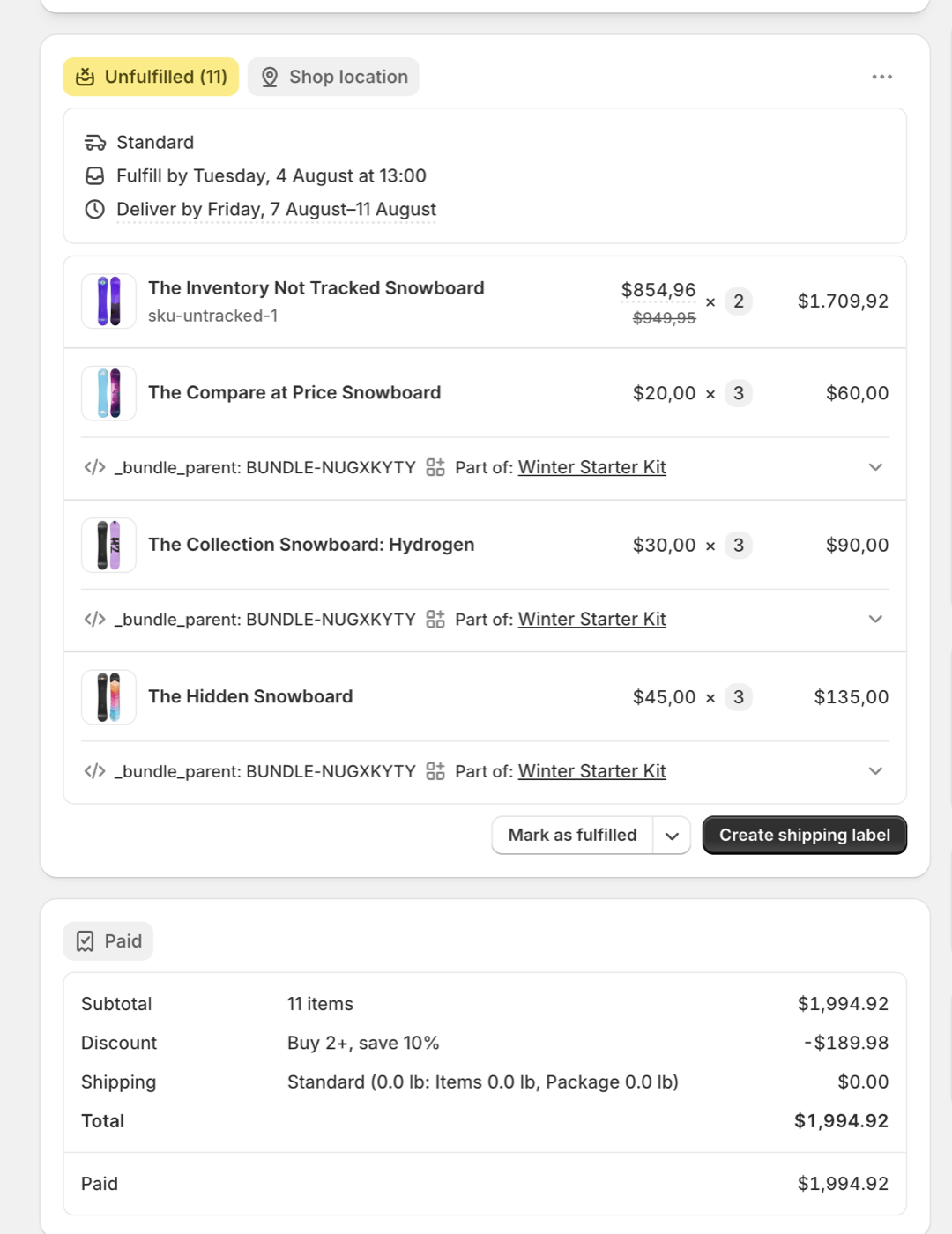
Apps built on Shopify's Cart Transform API expand the bundle into its component line items while the order is being created. The order your 3PL imports already contains real component SKUs, quantities, and prices, each line carrying a reference to the bundle it came from. Inventory decrements natively per component at the moment of sale, including per location, because it is Shopify's own inventory doing the counting, not a sync job imitating it. Refunds work at component level: a customer returns one item from a kit, you refund and restock that component.
This is a real paid order produced that way, not a mockup:
The variant to watch for: post-order editing
Some apps look like architecture 2 but are not. They show one bundle line through checkout, then rewrite the order into components after it is created. If your 3PL or shipping software imports orders instantly, that rewrite races the import, and sometimes loses: the warehouse gets the pre-rewrite version and packs the wrong thing. This exact failure mode shows up in merchant reports outside bundles too, whenever order contents change after creation while an integration holds the stale copy. When you evaluate an app, ask the vendor directly: do components enter the order during checkout, or are they written in afterwards?
The five-minute test that beats any sales page
Run this on every app you shortlist, including ours. Each check targets a failure mode that only shows up after you depend on the app.
- Place a test order and read the order itself. In Shopify admin, one opaque bundle line means architecture 1. Real component SKUs as separate line items mean architecture 2.
- Refund that test order and watch inventory. Component stock should restock correctly. If it does not, every customer return quietly corrupts your counts.
- Test every currency you sell in. A bundle that prices correctly in EUR can be off by cents in SEK or JPY. Multi-market rounding drift is the most commonly missed bundle bug.
- Ask when components enter the order. "During checkout" and "after creation" sound similar and behave completely differently under a fast order import.
- Ask what happens if the app is ever pulled from the App Store. Two major bundle apps left the App Store in July 2026, one after a security incident. A good answer describes what your orders and inventory look like without the app running. A vague answer is itself the answer.
What about bundle analytics?
The traditional knock on checkout-time expansion is that exploding the bundle into components loses bundle-level reporting. That objection is out of date. Shopify ships native bundle reports in Analytics: Total sales by bundle, Total sales by bundle component, and Bundle item versus non-bundle sales, all built on a standard bundle grouping that Shopify records on order line items. An expansion app that writes that grouping feeds those reports directly: time-scoped, per bundle, per component, in the reporting tool you already use, with history that lives in your store rather than in an app vendor's backend. When you evaluate an app in either architecture, check where its reporting lives. A paid in-app analytics dashboard is not a bonus feature; it is a symptom that the app's data never made it into your store's own records.
The honest tradeoffs of expansion
Architecture 2 is not free of costs, and a page like this is worthless if it pretends otherwise.
- Subscriptions: Shopify's Cart Transform API currently rejects subscription carts outright. If subscription bundles are core to your store, expansion apps cannot serve that slice today.
- Pick counts: component lines mean more picks at a 3PL that bills per pick. For bundles of two to four items this is usually noise. For high-count multipacks, the standard answer is a case SKU at the 3PL rather than per-unit picks.
- Report dependence on correct data: native bundle reporting only works if the app writes the bundle grouping correctly. That is exactly what check 1 of the five-minute test shows you.
Choosing between them
| Your situation | Better fit | Why |
|---|---|---|
| Merchandising-focused store, self-fulfilled, low order volume | Architecture 1 | Tidy single-line orders, widget variety, and the sync failure modes rarely bite at low volume. |
| 3PL, WMS, or barcode scanners touch your orders | Architecture 2 | The order already contains what the warehouse needs to pick. Removes the translation table and the sync race entirely. |
| Multi-location or multi-currency selling | Architecture 2 | Native component inventory is location-aware by construction, and pricing should be verified per market either way (check 3). |
| Subscription bundles are the product | Architecture 1 | Cart Transform currently rejects subscription carts. Expansion apps cannot serve this today. |
The short version many merchants have found useful: bundle setups are either analytics-clean (the bundle is its own product, tidy reporting, sync jobs forever) or ops-clean (the order carries real components, warehouses just work). Almost every app picks analytics-clean. If fulfillment is where your tickets come from, pick ops-clean.
What is Solid Bundles?
Solid Bundles is Crescano's Shopify app for fixed bundles, kits, and quantity breaks, built on the Cart Transform API. Checkout-time expansion is not a feature toggle but the only way it works: real component SKUs land in every order by construction. A built-in verification tool creates real test carts in every market you sell to and reports what customers will actually pay, which automates most of the five-minute test above. It does not yet do mix-and-match bundles; if that is core to your store, tell us and we will notify you when the builder ships. The setup guide, 3PL guide, and troubleshooting docs are public if you want to inspect the details first.
Install the trial, place a test order, and read it. If the order does not show real component SKUs with correct inventory movement, you will know in five minutes and it cost you nothing. We are also still onboarding a small number of early stores on a free lifetime plan: email [email protected] if you want in.
VIEW ON THE APP STOREMigrating off a specific app? See Moving off Rebolt, Moving off Fast Bundle, or Moving off Stocky. Comparing prices? See what bundle apps actually cost at your volume.